Your team knows SQL.
Why learn Python for AI?
Add AI operators to SQL
- from your own SQL client
- on your own database
- real syntax — not
ai_query('{json...}')
No notebooks. No orchestration code.
WHERE description MEANS 'urgent'
Express intent, not patterns — especially when you don't know what you're looking for.
Works with your existing databases, SQL clients & AI providers—including Vertex AI, AWS Bedrock, and Azure OpenAI
 PostgreSQL
 MySQL
MySQL
 SQLite
 Snowflake
 BigQuery
 MongoDB
 Redis
Redis
 Parquet
 Delta
Delta
 Iceberg
 Azure
Azure
 S3
PostgreSQL
MySQL
SQLite
Snowflake
BigQuery
MongoDB
Redis
Parquet
Delta
Iceberg
Azure
S3
S3
PostgreSQL
MySQL
SQLite
Snowflake
BigQuery
MongoDB
Redis
Parquet
Delta
Iceberg
Azure
S3
 Excel
Excel
 JSON
JSON
 CSV
CSV
 MCP
MCP
 OpenRouter
 HF Spaces
HF Transformers
HF Spaces
HF Transformers
 Ollama
 Pinecone
 Vertex AI
 Bedrock
 Azure OpenAI
 Cassandra
 GCS
MCP
OpenRouter
HF Spaces
HF Transformers
Ollama
Pinecone
Vertex AI
Bedrock
Azure OpenAI
Cassandra
GCS
GCS
MCP
OpenRouter
HF Spaces
HF Transformers
Ollama
Pinecone
Vertex AI
Bedrock
Azure OpenAI
Cassandra
GCS
One line. That's all it takes.
Same query. Now it gets what you mean, not just what you declared.
SELECT * FROM support_tickets
WHERE priority = 'high'
SELECT * FROM support_tickets
WHERE description MEANS 'urgent customer issue'
That's it. You just added AI to your query. No Python. No APIs. No orchestration code.
Wait, it gets weirder.
You describe the dimensions. AI discovers what fits.
SELECT
    TOPICS(tweet, 4) AS topic,
    CLASSIFY(tweet, 'political', 'not-political')
        AS political,
    COUNT(*) AS tweets,
    AVG(likes) AS avg_likes
FROM twitter_archive
GROUP BY topic, political
Semantic operators work just like regular SQL functions.
Mix them together. Nest them. Use them in WHERE, GROUP BY, ORDER BY. It's just SQL.
Your data never moves. The intelligence comes to it.
Add AI to any database without copying a single row. LARS is a query layer, not a data store.
Use your existing SQL client. Seriously.
LARS speaks PostgreSQL wire protocol. That means your existing tools just work. No plugins. No extensions. No new software to learn.
Your favorite SQL IDE. Your existing workflows. Now with AI operators.
# Start LARS
$ lars serve sql --port 15432

# Connect with any PostgreSQL client
$ psql postgresql://localhost:15432/default

# Now you have AI operators
SELECT * FROM tickets
WHERE description MEANS 'urgent'
Vector search in SQL. No extra infrastructure. Ad-hoc.
No ingestion pipelines. No upfront planning. Embed any column from any source DuckDB can reach—storage and indexing handled automatically.
SELECT id, EMBED(description)
FROM products;
That's it. No schema changes. No separate setup.
Vectors are stored and indexed automatically.
SELECT *
FROM VECTOR_SEARCH(
  'eco-friendly household items',
  'products', 20
)
Returns the 20 most similar products. Instant.
The hybrid trick: 10,000x cost reduction
Vector search is fast but imprecise. LLM judgment is precise but expensive. Combine them.
WITH takes AS (
  SELECT * FROM VECTOR_SEARCH('affordable eco products', 'products', 100)
)
SELECT * FROM takes
WHERE description MEANS 'genuinely eco-friendly, not greenwashing'
LIMIT 10;
LLM once, SQL forever.
The LLM figures out the pattern once. Every row with the same shape after that? Pure SQL. Millions of rows, ~10 LLM calls.
SELECT parse(phone, 'area code')
FROM contacts
SELECT smart_json(data, 'customer name')
FROM orders
Code that writes code, cached by shape
The LLM generates a SQL expression (like a Lisp macro). That expression is cached by the data's structural fingerprint. Different values, same shape? The cached SQL runs directly. No LLM call needed.
The query you don't have to write.
You know what you want. Just not which tables. Ask in English—LARS already mapped your schema.
ask_data_sql() instead
SELECT * FROM ask_data('metallica shows by country plus the most played song in each country');

-- or statement syntax:
ASK_DATA 'metallica shows by country plus the most played song in each country';
| country | shows | top_song | times_played |
|---|---|---|---|
| United States | 847 | Enter Sandman | 831 |
| Germany | 156 | Master of Puppets | 152 |
| United Kingdom | 134 | One | 128 |
| ... |
SELECT ask_data_sql('top 10 customers by revenue this quarter');
SELECT c.name, SUM(o.total) as revenue FROM customers c JOIN orders o ON c.id = o.customer_id WHERE o.date >= '2024-10-01' GROUP BY c.name ORDER BY revenue DESC LIMIT 10
ask_data is read-only—no accidental mutations. Need DDL or writes? ask_data_sql generates them (just won't execute).
Alerts that understand meaning.
Traditional triggers fire on exact values. WATCH fires on intent. Subscribe to any query, trigger actions when results change—using the same semantic operators.
WHERE error_count > 100
AND status = 'critical'
WHERE message SIMILAR_TO
'frustrated, want to cancel'
CREATE WATCH churn_detector
POLL EVERY '5m'
AS SELECT customer_id, feedback
   FROM customer_feedback
   WHERE created_at > now() - INTERVAL '10 minutes'
     AND feedback SIMILAR_TO 'frustrated, want to cancel'
ON TRIGGER CASCADE 'retention_outreach.yaml';
The question after the query.
You ran a query. Now you want to know why.
Pipe your results through THEN ANALYZE—an agent investigates, runs more SQL, writes Python, uses your tools—then saves findings. Fire and forget.
INTO target table
SELECT month, churn_rate, segment
FROM metrics
WHERE year = 2024
THEN ANALYZE 'Why did churn spike in Q3?'
INTO churn_insights;
SELECT * FROM churn_insights;
SELECT * FROM metrics
THEN MY_CUSTOM_ANALYZER 'deep dive'
INTO custom_analysis;
Any cascade becomes a pipeline stage. Domain expert? Compliance bot? Define it in YAML, use it in SQL.
Query first. Transform after.
Chain AI transformations on your results with THEN.
Dedupe, filter, analyze, speak—pipe data through any stage.
Save snapshots at each step with INTO.
SELECT * FROM customer_feedback
WHERE quarter = 'Q4'
THEN DEDUPE('email') INTO deduped
THEN FILTER('urgent issues') INTO urgent
THEN ANALYZE 'What are the patterns?'
INTO q4_analysis;
AI classifies your data, routes to different workflows.
SELECT * FROM transactions
THEN CHOOSE BY FRAUD_DETECTOR (
    WHEN 'fraudulent' THEN BLOCK
    WHEN 'suspicious' THEN REVIEW
    ELSE ALLOW
);
LLMs are unpredictable. So run them all. Bad outputs don't need handling - they just don't win.
Same prompt, wildly different results. Instead of hoping for the best, run 5 variations in parallel—different prompts, different models—and let an evaluator pick the winner. Bad outputs don't need handling. They just don't win.
Simpler error handling
Failures filter out naturally. Retries still exist when you need them—but takes handle most cases.
Multi-model racing
Run Claude, GPT-4, Gemini simultaneously. Discover which model works best for YOUR task.
Prompt exploration
Different prompt styles compete. Formal vs casual. Detailed vs concise. Best one emerges.
Cascade-level too
Run entire workflows in parallel. Only surface the winning execution. Wild.
takes:
  factor: 5                              # Run 5 variations
  evaluator_instructions: "Pick the most accurate and complete summary"
For ad-hoc queries? A SQL comment.
No config files. Just annotate your query.
-- @ takes.factor: 3
SELECT description MEANS 'eco-friendly'
FROM products;
-- @ models: [claude-sonnet, gpt-4o, gemini-pro]
SELECT review SUMMARIZE 'key complaints'
FROM reviews;
Three frontier models. One SQL comment. Best answer wins.
LLM Evaluator
AI judge picks best output based on your criteria
Human Evaluator
Present options to humans for critical decisions
Pareto Frontier
Multi-objective: balance quality, cost, and speed
Weighted Random
Exploration mode for discovering new optima
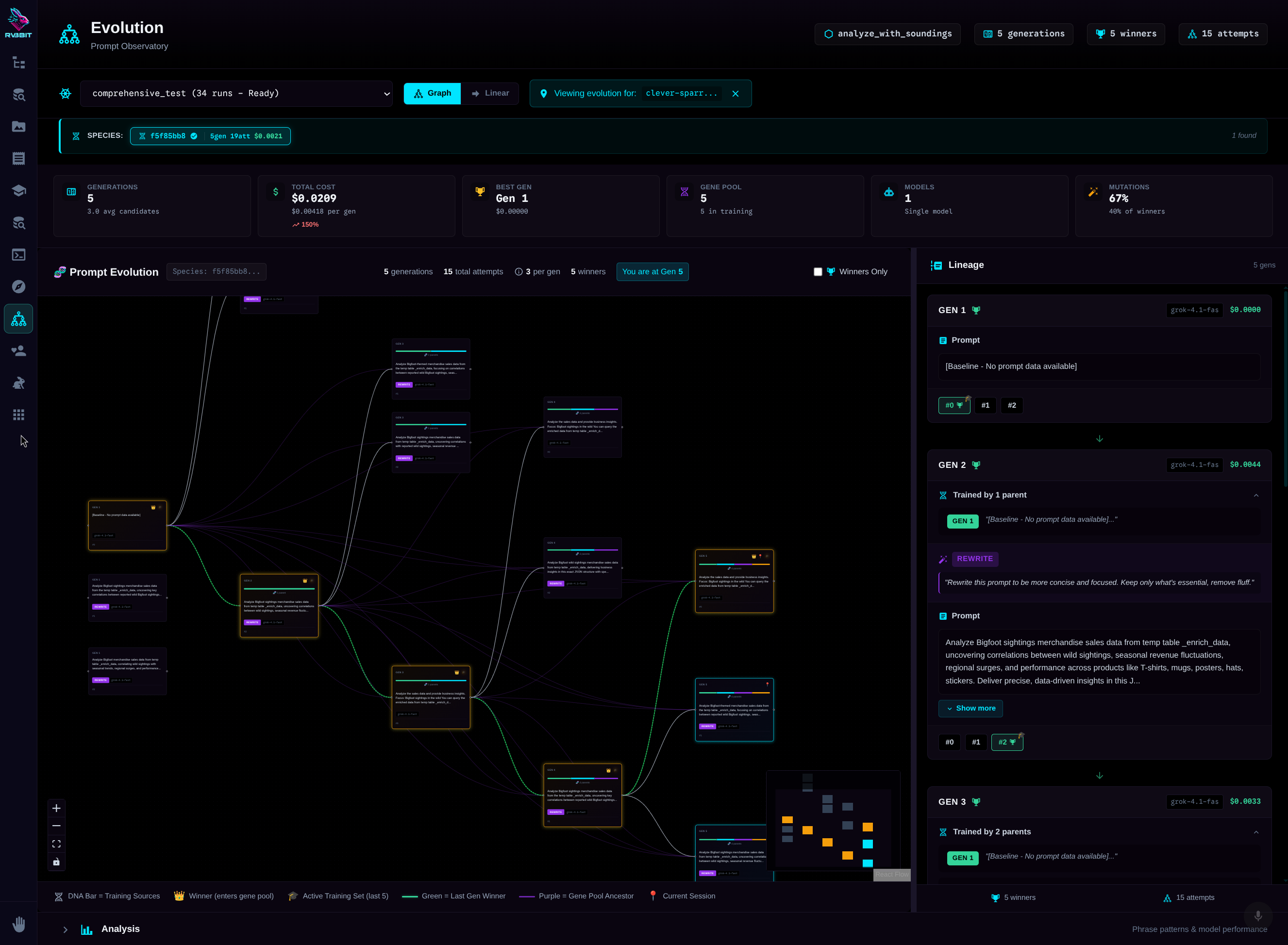
Your prompts compete. Winners breed.
Five prompt variations compete. Winner moves to production. There, it runs 3x per request—random failures just don't win. Production data feeds the next generation. Your prompts literally evolve.
Development: Mutation
5 different prompts compete. LLM evaluator picks winner. Genetic diversity.
Production: Cloning
Champion prompt cloned 3x. Same prompt, different executions. Best one wins.
Result: Filtered Errors
Random hallucinations? JSON parse failures? They just don't win. No retry logic.
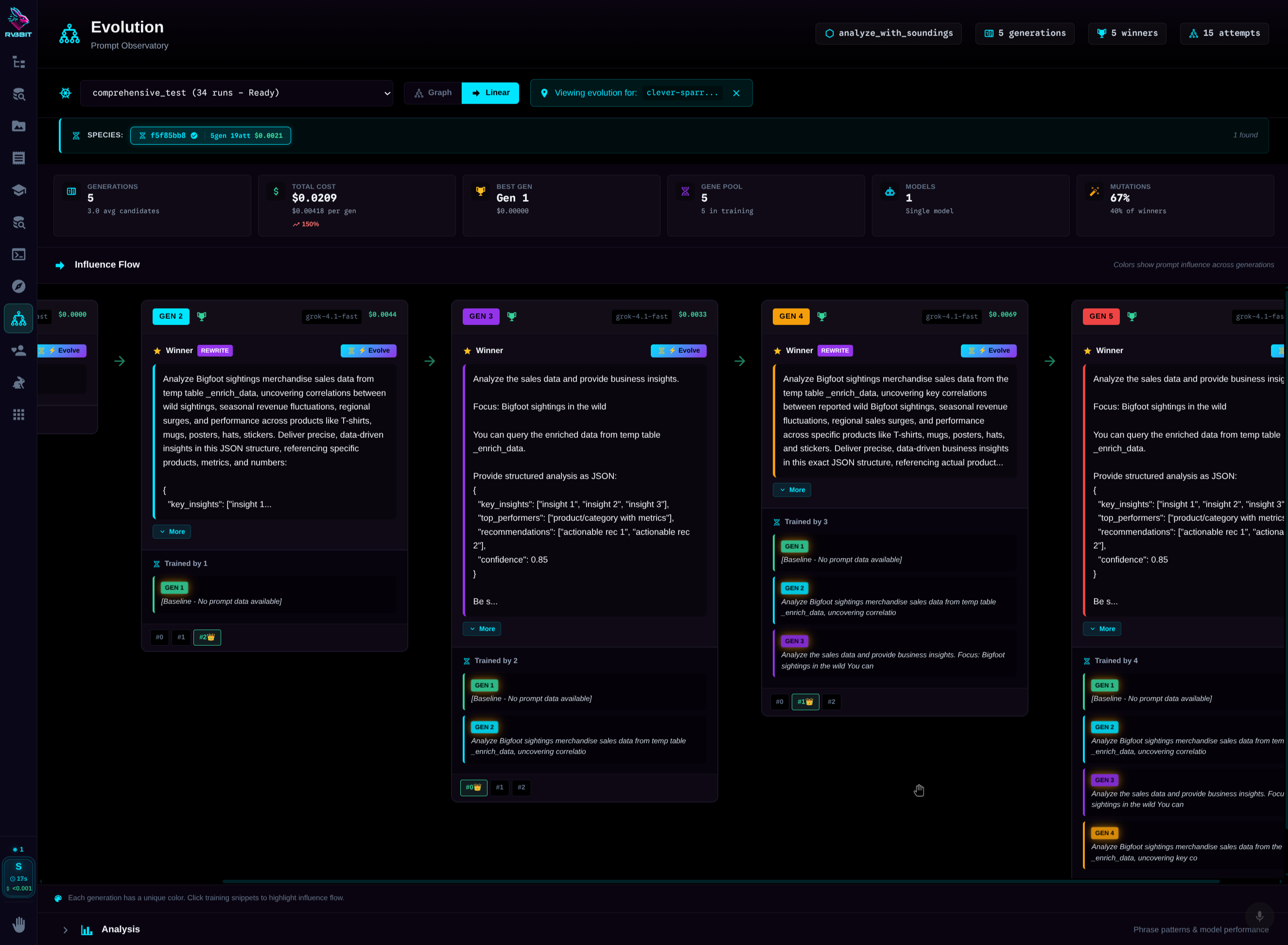
Code that writes code. Tests that write tests.
Five properties that make LARS fundamentally different.
Self-Orchestrating
Agent picks tools based on context—including MCP tool servers. No hardcoded tool lists.
Self-Testing
Tests write themselves from real executions. Freeze & replay.
Self-Optimizing
Prompts improve automatically through genetic selection.
Self-Healing
Failed cells debug and repair themselves with LLM assistance.
Self-Building
Cascades built through conversation. Chat to create workflows.
Your queries are training data.
Every LLM call is logged. Every input. Every output. Every confidence score. Browse this history. Mark the good outputs. They become few-shot examples automatically.
use_training: true on any cascade
Start simple. Go deep when ready.
Most teams are production-ready in a week. Here's the typical path.
Semantic filtering
Replace regex and LIKE patterns with natural language understanding. Instant win.
AI aggregations
Group by category, let AI summarize each bucket. Still just SQL.
Takes enabled
Run 3 variations, best wins. Errors filter out. Production-grade reliability.
Custom operators
Drop a YAML cascade. Get a new SQL operator. Your team extends the language.
100+ AI operators. Still just SQL.
Semantic filtering. Argumentation analysis. Knowledge graphs. Text aggregation. Data quality. MDM. Critical thinking as SQL functions.
SELECT
    outlook,
    COUNT(*) AS reports,
    CONSENSUS(recommendation) AS analyst_view,
    SUMMARIZE(analysis) AS key_themes
FROM analyst_reports
WHERE analysis CONTRADICTS 'management guidance'
GROUP BY NARRATIVE(analysis) AS outlook
ORDER BY reports DESC
Hover over a highlighted operator to see what it does
CONTRADICTS
"Does this contradict the management guidance?"
Semantic logic check. Finds conflicts between text and a reference claim. Unique to LARS.
NARRATIVE()
"What market outlook is the author conveying?"
Semantic GROUP BY on narrative framing. One LLM call categorizes all rows by the story they're telling.
CONSENSUS()
"What do these analysts agree on?"
Aggregate function that finds common ground across multiple texts. Synthesizes agreement, notes disagreement.
SUMMARIZE()
"Combine these analyses into key themes"
Aggregate function that condenses multiple text rows into a single coherent summary.
Stay on the surface. Or go deep.
Some people just want queries that work. Others want to see every token. Both are valid. The UI is optional.
Just the results
Write SQL. Get data. That's it. The AI is invisible.
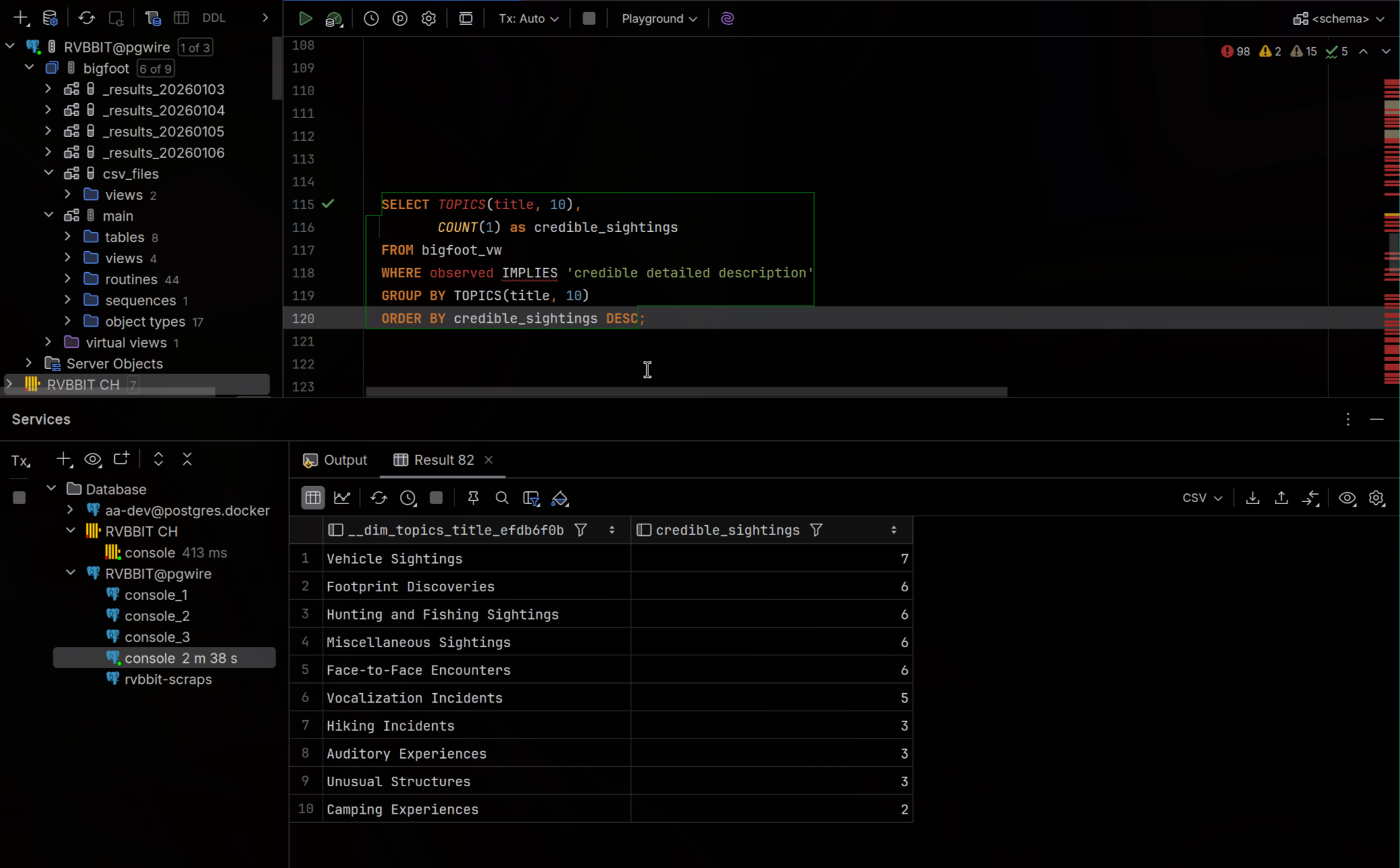
Cascades Dashboard
See all your workflows at a glance. Cost per cascade. Success rates. Recent runs.
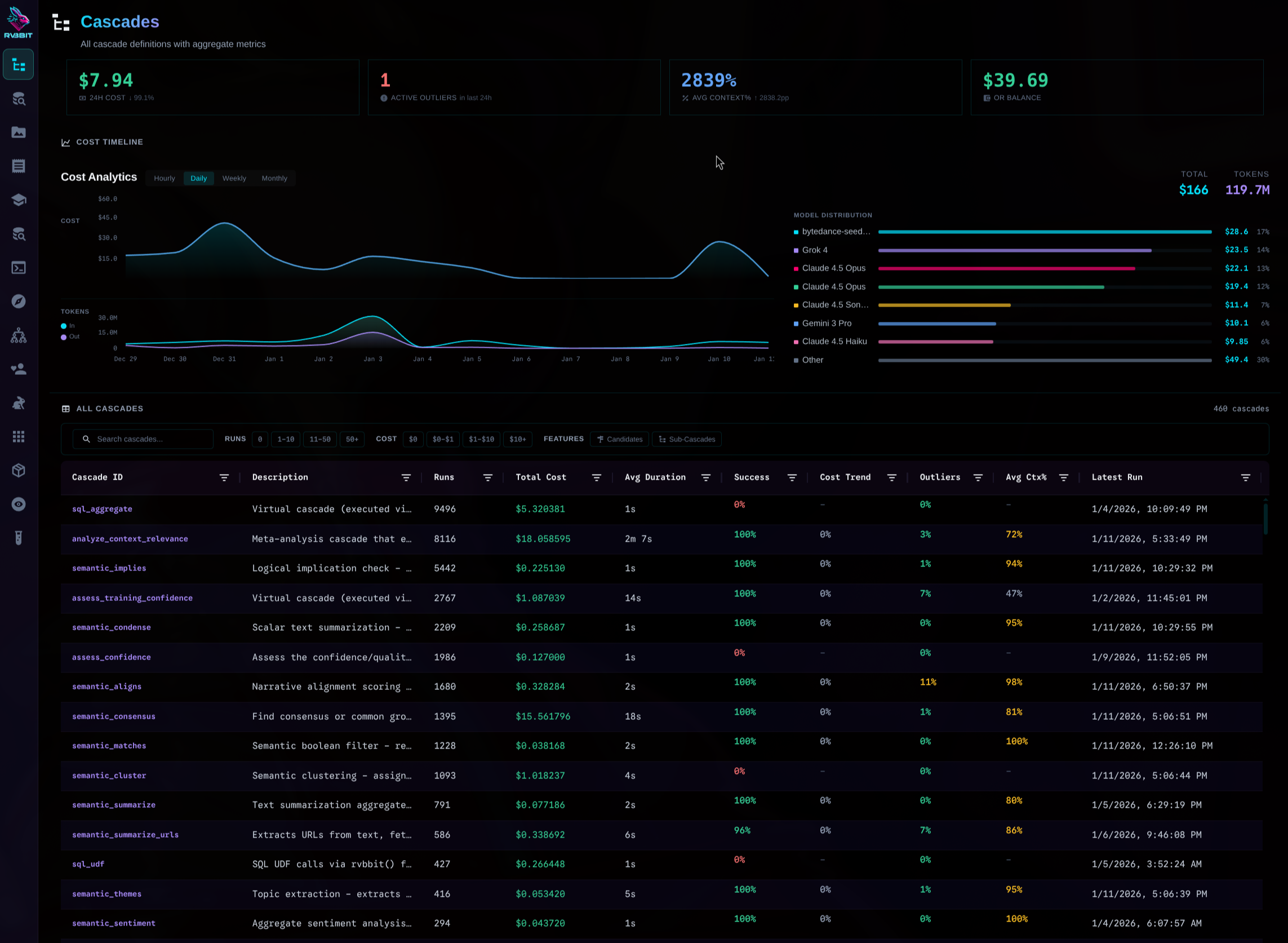
Cascade Execution
Watch workflows unfold. See takes race. Pick winners.
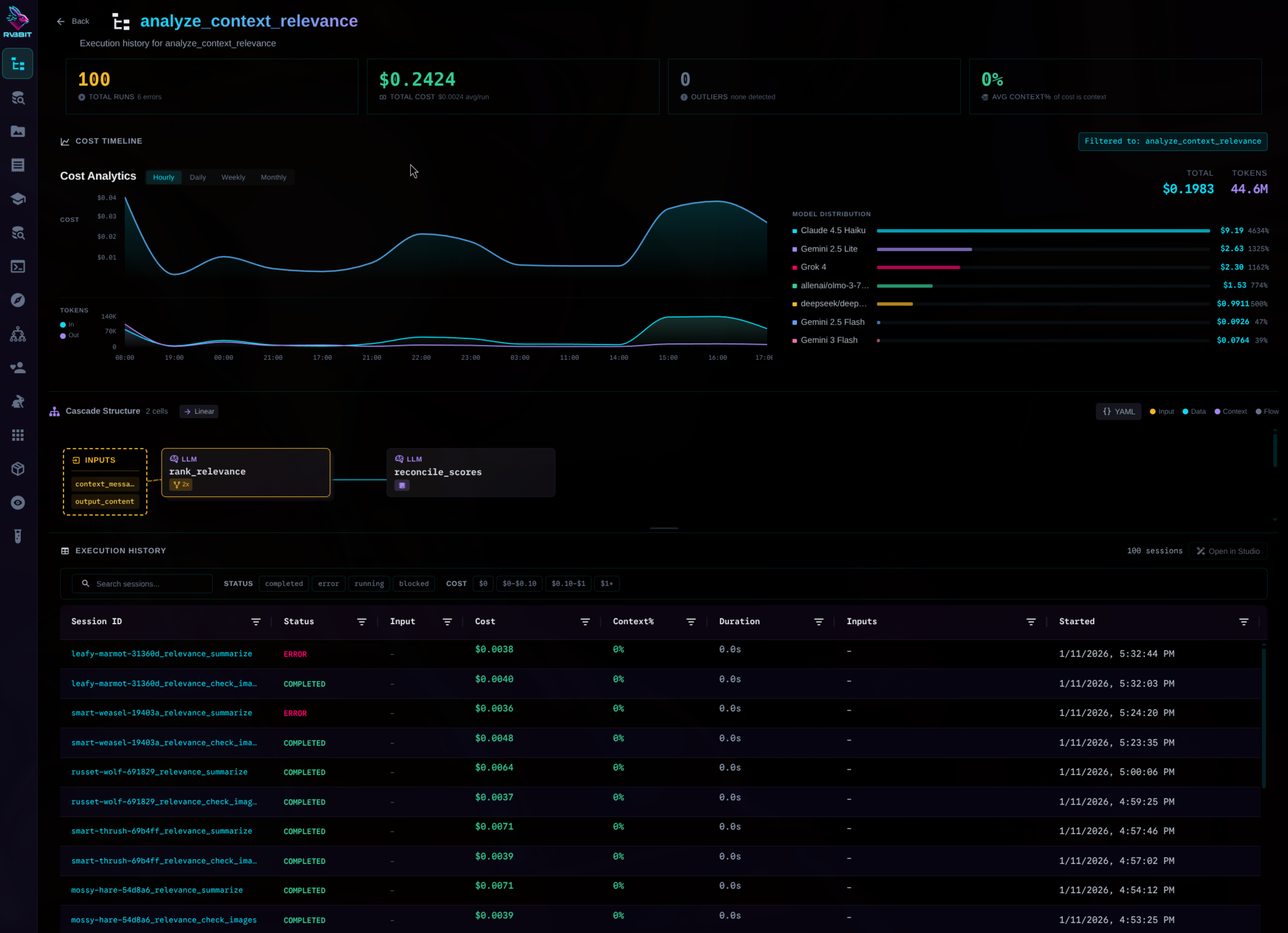
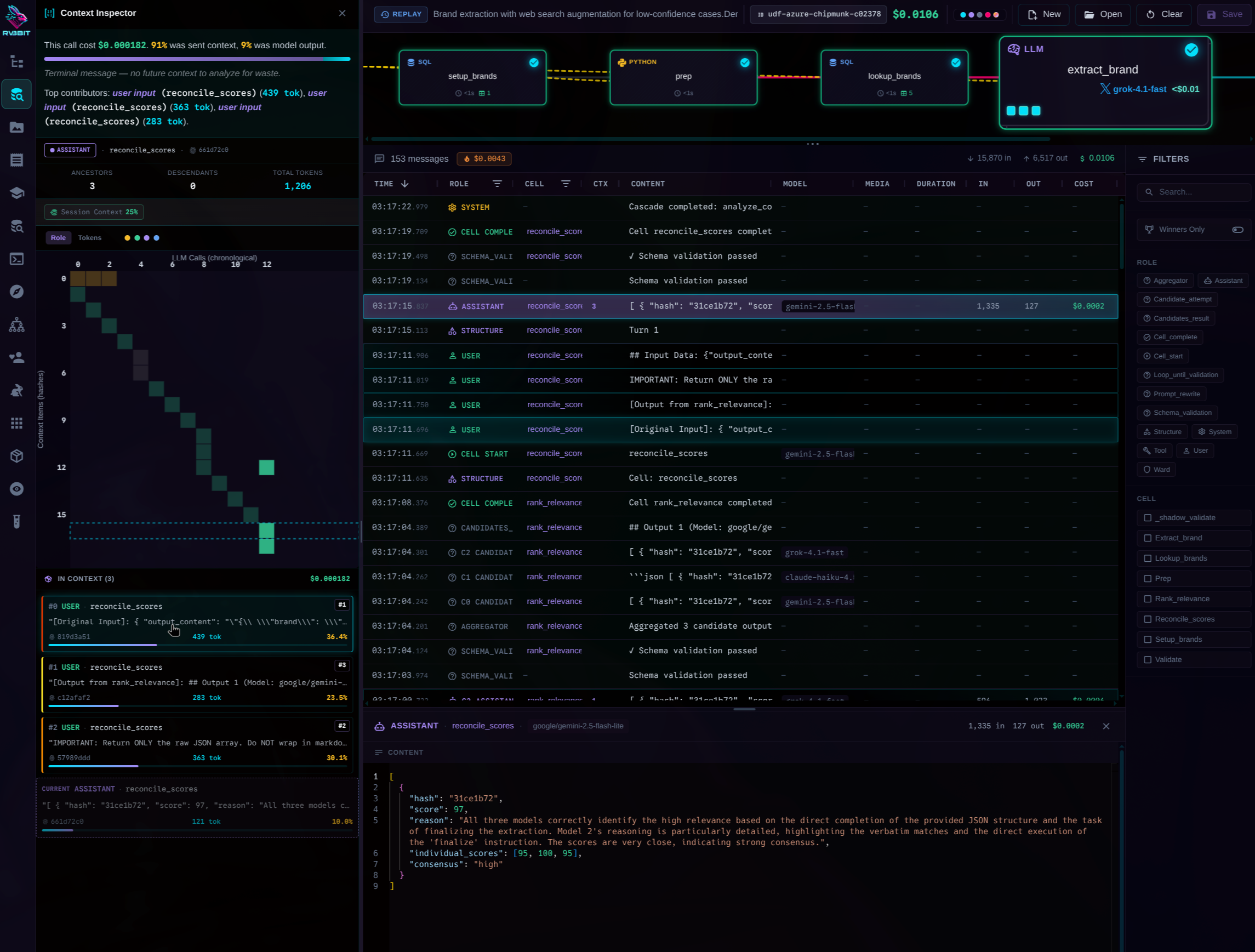
Context Inspector
See exactly what the LLM saw. Every token. Every piece of context. Content-hashed for deduplication.
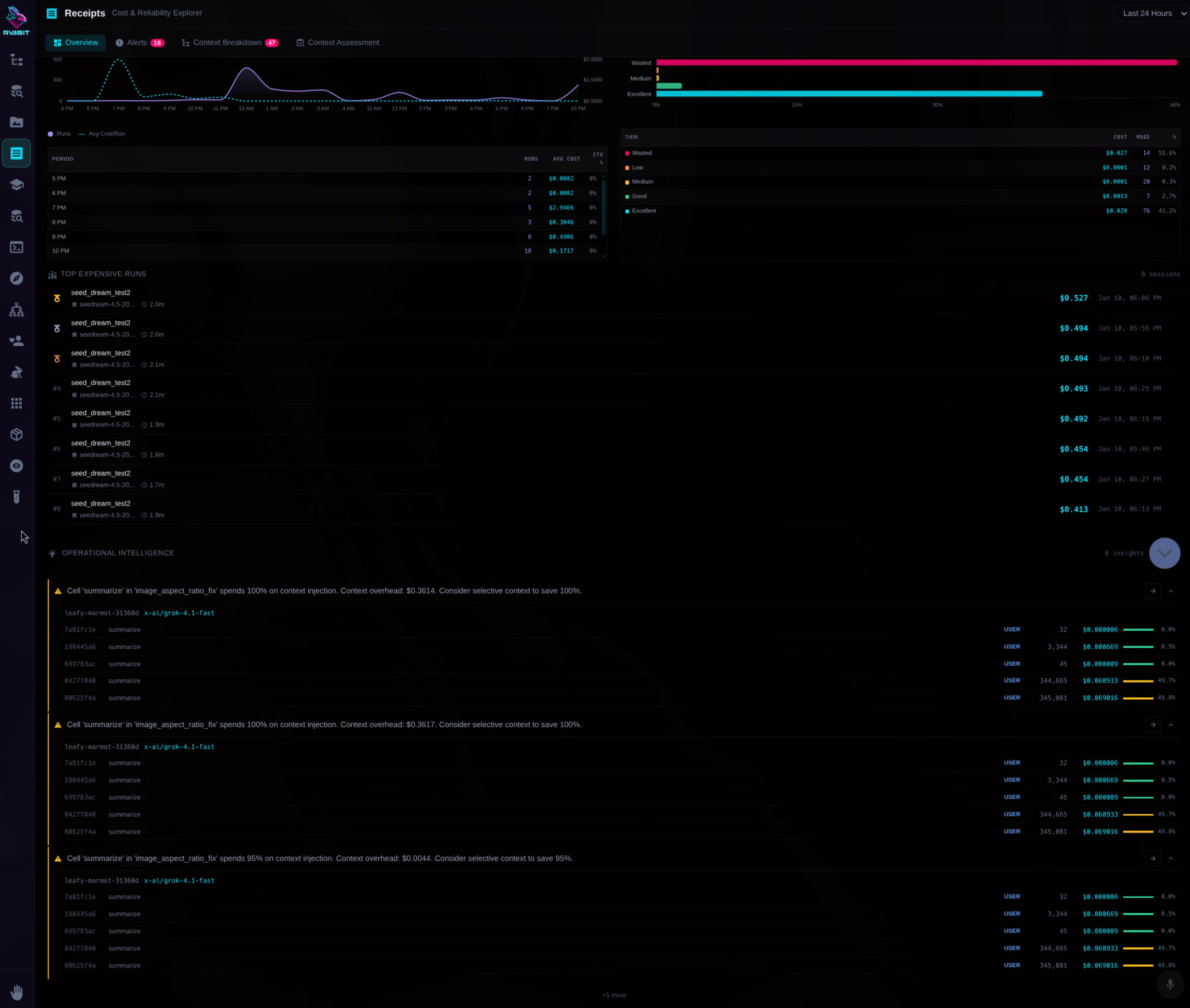
Cost & Reliability Explorer
Drill down into costs. By cascade. By cell. By model. By hour.
The UI is completely optional. Everything works via SQL or command line.
When finance asks where your LLM budget went...
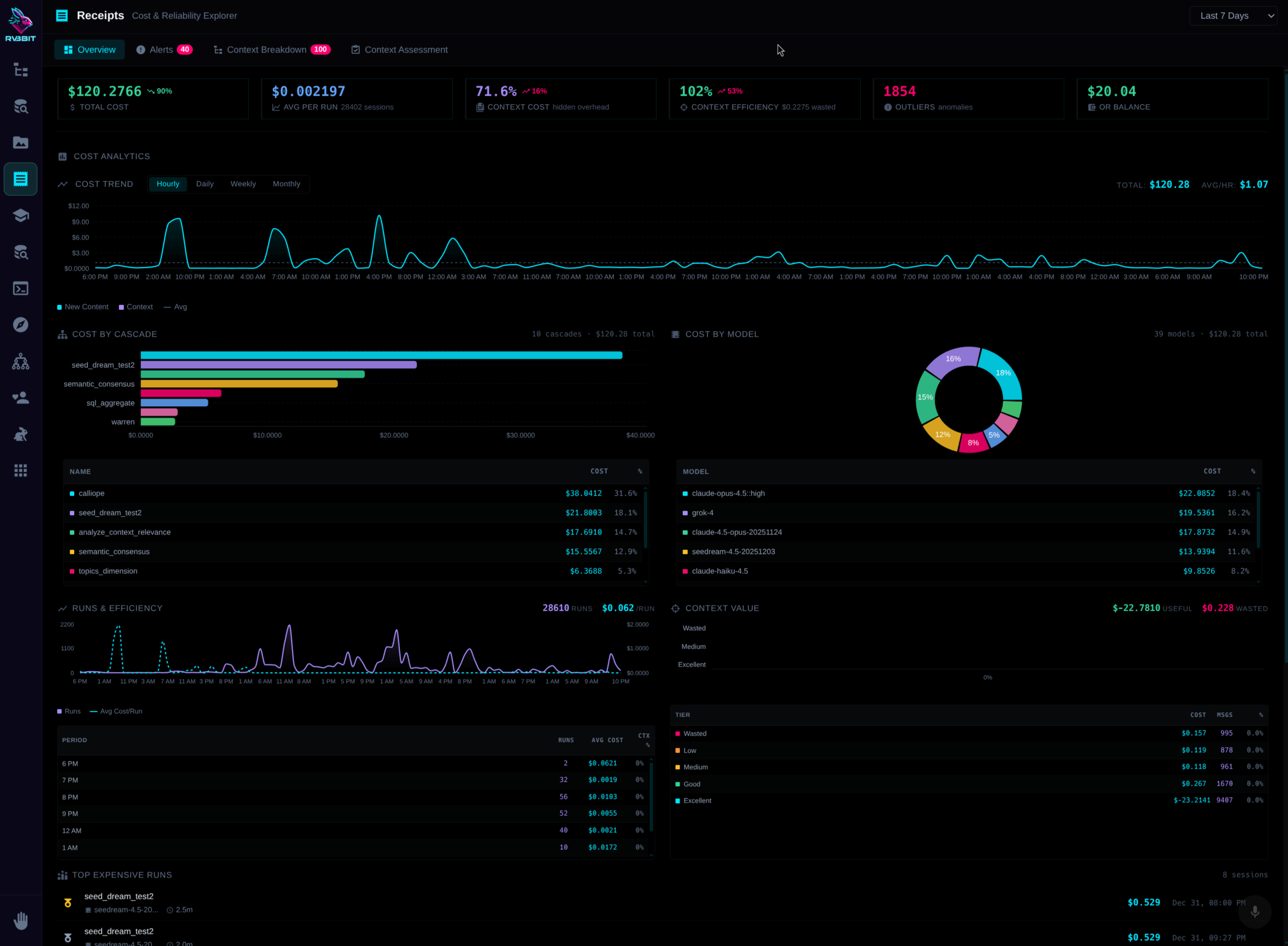
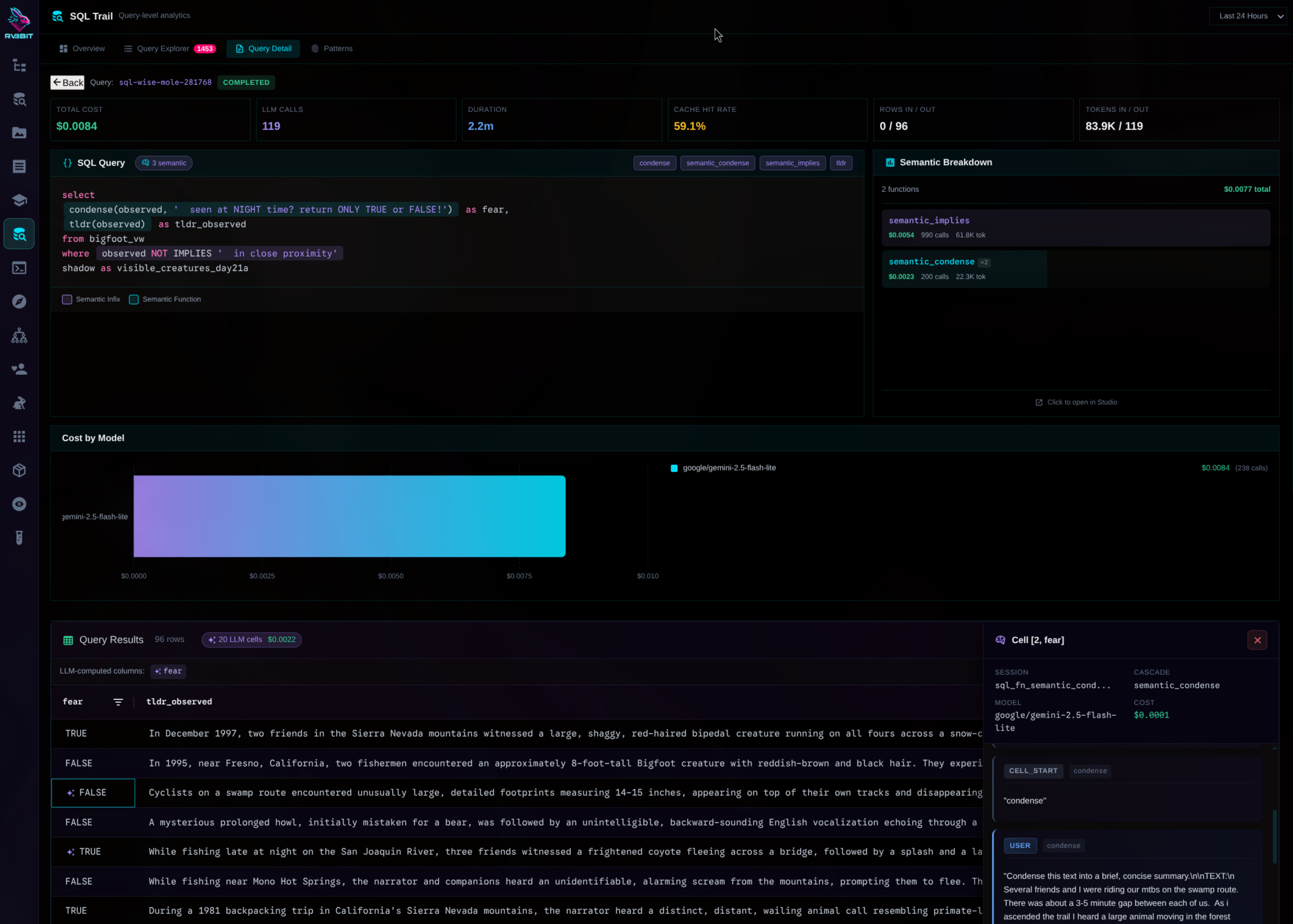
Show them exactly which queries, which models, which users drove that OpenAI bill. Not buried in JSON trace files or separate dashboards—it's all in SQL tables. Query your costs the same way you query your data.
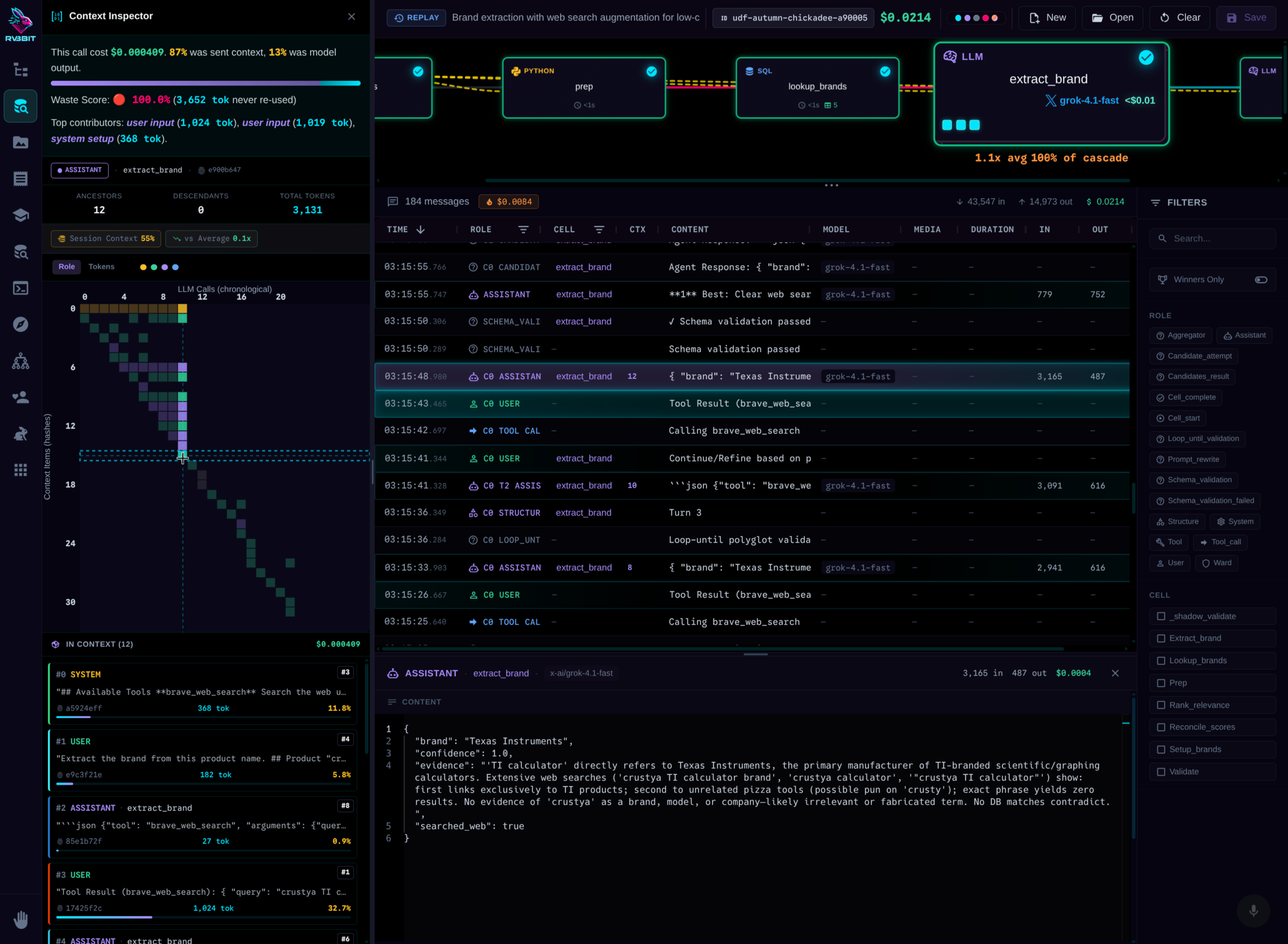
Token-level cost attribution
See exactly what each piece of context cost. Which tokens were expensive. Where the money went.
Query-level analytics
Track every query. Cache hit rates. Model distribution. Cost trends over time.
Full context lineage
See exactly what went into every LLM call. Which items were reused. What's driving cost growth.
The magic trick behind the operators.
You've been using cascades this whole time. That MEANS operator? It's a YAML file.
cascade_id: semantic_matches

sql_function:
  operators:
    - "{{ text }} MEANS {{ criterion }}"

cells:
  - name: evaluate
    model: gemini-2.5-flash-lite
    instructions: |
      Does this text match the criterion?
      Text: {{ input.text }}
      Criterion: {{ input.criterion }}
Every operator is a file.
Want to change the model? Edit the file. Want stricter validation? Add a ward. Want three models to compete? Add takes.
The same system powers everything.
A simple MEANS check (1 cell) and a fraud detection workflow (7 cells, 3 models) are both cascades. Same primitives, different depths.
No abstraction gap.
Analysts use operators. Engineers customize cascades. Same system, different entry points.
This is why LARS scales: Start with one-liners. Evolve to workflows. Never switch tools.
Need a custom operator? It's just YAML.
Drop a file. Restart. Your operator works. No code changes required.
cascade_id: semantic_sounds_like

sql_function:
  name: sounds_like
  operators:
    - "{{ text }} SOUNDS_LIKE {{ ref }}"
  returns: BOOLEAN

cells:
  - name: evaluate
    model: gemini-2.5-flash-lite
    instructions: |
      Do these sound phonetically similar?
      Text: {{ input.text }}
      Reference: {{ input.ref }}
      Return only true or false.
Instantly available in SQL
SELECT * FROM customers
WHERE name SOUNDS_LIKE 'Smith'
Auto-discovered at startup
Loaded 52 AI operators
• 18 infix: MEANS, CONTRADICTS, SIMILAR_TO...
• 34 functions: SUMMARIZE, DEDUPE, GOLDEN_RECORD...
Tools are cascades too. Call any of them from SQL.
Every LARS tool—Python, JavaScript, Clojure, TTS, HuggingFace Spaces, even MCP tool servers—is callable directly from SQL. Tools are auto-discovered and indexed, so agents can find what they need without hardcoded lists.
SELECT * FROM skill::python_data(
  code := '[x**2 for x in range(10)]'
);
SELECT * FROM skill::huggingface(
  space := 'stabilityai/sdxl',
  prompt := 'data visualization rabbit'
);
SELECT * FROM skill::list_directory(
  path := '/tmp'
);
SELECT * FROM skill::say(
  text := 'Query complete. 47 anomalies found.'
);
SELECT * FROM skill('list_skills', '{}');
When SQL isn't enough? Chain languages.
Each cell output becomes a queryable temp table. Chain SQL, Python, JavaScript, Clojure, and LLM cells in one pipeline. Each language does what it's best at.
Auto-materializing temp tables. Each cell's output becomes _phase_name that downstream SQL can query.
Python accesses prior cells via data.previous_cell dataframe.
No export/import. No glue code. It just flows.
"But it's just prompts, right?"
Here's what a single operator could be doing underneath.
SELECT * FROM insurance_claims
WHERE description IS_FRAUDULENT
Web search. Database lookups. Three models debating. Consensus building. Validation. All invisible. All logged. All from one SQL operator. You'll probably never need to know this. But when you do—it's all there.
Your SQL. Your databases.
Now with AI.
Start with one AI operator. Build from there. Your analysts stay in SQL. Your engineers get full observability. Your CFO gets the receipts.
pip install larsql